Setting up a K8 Cluster
Topic
How are K8 clusters actually set up? How do you get the nodes to communicate with each other? Can you simulate a kubernetes cluster locally? You must be able to if the idea is for it to be hardware agnostic.
Conjecture
I assume this is relatively complex but that it can mostly be done in Terraform. Essentially there must be some core compute node that the orchestration runs on and then you can link additional sub nodes to the orchestration node. The real question is how does this work locally? Can you simulate it on a single machine? How can I test and familiarize myself with how kubernetes works on a deeper level?
Research
Ok so the answer to “can you simulate a kube cluster locally is yes, of course. You can use the tool Kind to set up a local “control plane” in docker which is essentially a local k8 sandbox to test your code in.
The control plane node is the core of kubernetes it contains an API server, scheduler, etcd (DB), and controller manager.
You should think of a K8s as an execution loop. The API server stores what you want to run in etcd, and then the controller compares the desired state vs. the actual state and makes corrections.
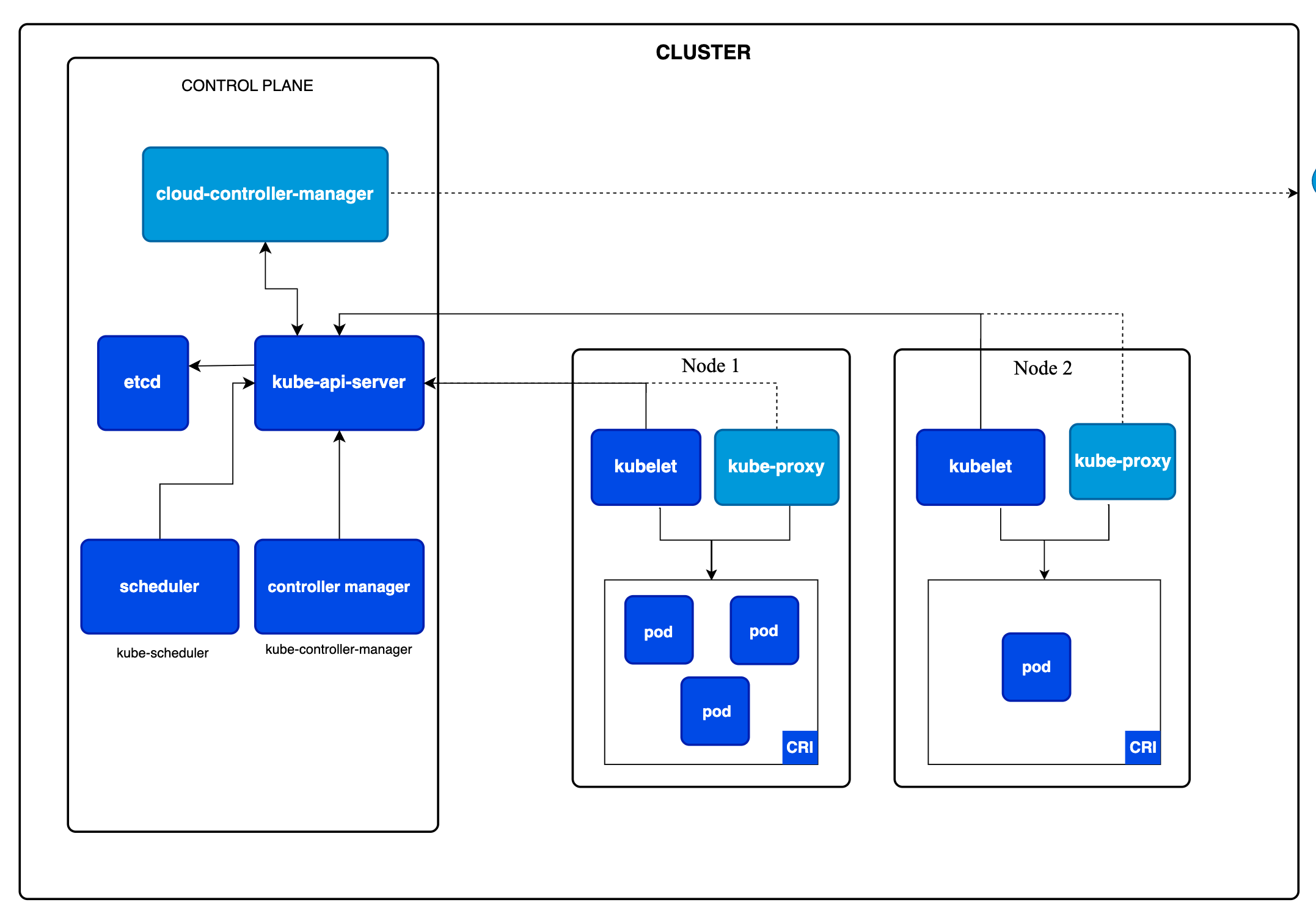
Here is the architecture diagram from the Kubernetes website. The kind tool has set up everything in the control plan in a container in docker. So now we can push a config to the control plane and see how it manages the deployment. Also note that the control plane is essentially a node in the cluster but it doesn’t take on any pods, it just manages the state and configs in the cluster.
Ok actually I’m wrong.
The control plane can take on pods. At least the kind one can — a real production cluster usually taints the control plane node so that workloads get scheduled onto the worker nodes instead, but that is a policy, not a hard rule. Essentially I created a very simple container and then applied it to the cluster and then a new pod was created on the control plane node.
The image I created was a simple nginx server that is up and running. I can interact with it by forwarding the port to my localhost and then I can have it open in the browser. When I delete the pod. It is deleted and then the cluster stops running any resources.
So now we are getting into the kinds of configs that are supported by k8s. So when you define something in your cluster there are lots of different types/kinds of config:
- Pod - Single Instance of an Image
- Deployment - Multiple instances of an Image and auto restarting of crashed images
- Service - creates a stable IP and load balancing for a deployment
- Ingress - creates an external access point for your service
Each of these kinds have different properties but at their core they are all defined by a .yml file. A pod is just a single resource, a deployment can define an image with multiple replicas i.e. pods, A service also defines an image with multiple replicas but then it allows access to all of the pods via a stable IP address.
Final Summary
Ok so I learned a lot from this in terms of how a k8s cluster actually functions. Essentially everything is just a bunch of yml files defining deployments, services and ingress points. In our existing services we manage these config files using terraform. The containers for the project are build and then store in ECR in aws and then the terraform files just point to the images. I now have a basic set up for the next.js app in our preview K8s cluster.